Resell
What is Resell?
Nstdata Resell is an API integration solution for proxy resellers, platforms, and enterprise customers. It lets you integrate Nstdata's proxy capabilities into your own website, application, or business system through a unified server-side API and provide proxy services to your downstream customers.
Which proxy products are supported?
Resell covers all proxy products currently offered by Nstdata, including Residential, IPv6, Datacenter, Static ISP, and Mobile Proxies.
With the Resell API, you can retrieve available products and locations, create and manage Channels, generate proxy connections, and query traffic usage. For static IP products, you can also retrieve purchasable products and manage purchases, renewals, and orders.
How do I use the Resell API?
The Resell API is designed for server-side integration. To activate the Resell service, contact Nstdata support through Discord (opens in a new tab) or Telegram (opens in a new tab). Once activated, follow the steps below to retrieve your Service Token and use it to authenticate API requests.
Step 1: Find and copy your Service Token
- Sign in to the Nstdata Dashboard (opens in a new tab) and select Workspace → Resell in the left sidebar.
- Use the project selector (Select project) below Data dashboard to choose the project you want to integrate. If you have multiple projects, make sure the intended project is selected.
- Find the Service token field on the right side of the same row. The token starts with
nst_svc_, and longer values may appear truncated on the page. - Click the copy icon (Copy service token) on the right side of the field to copy the full token. Do not manually transcribe the truncated value shown on the page.
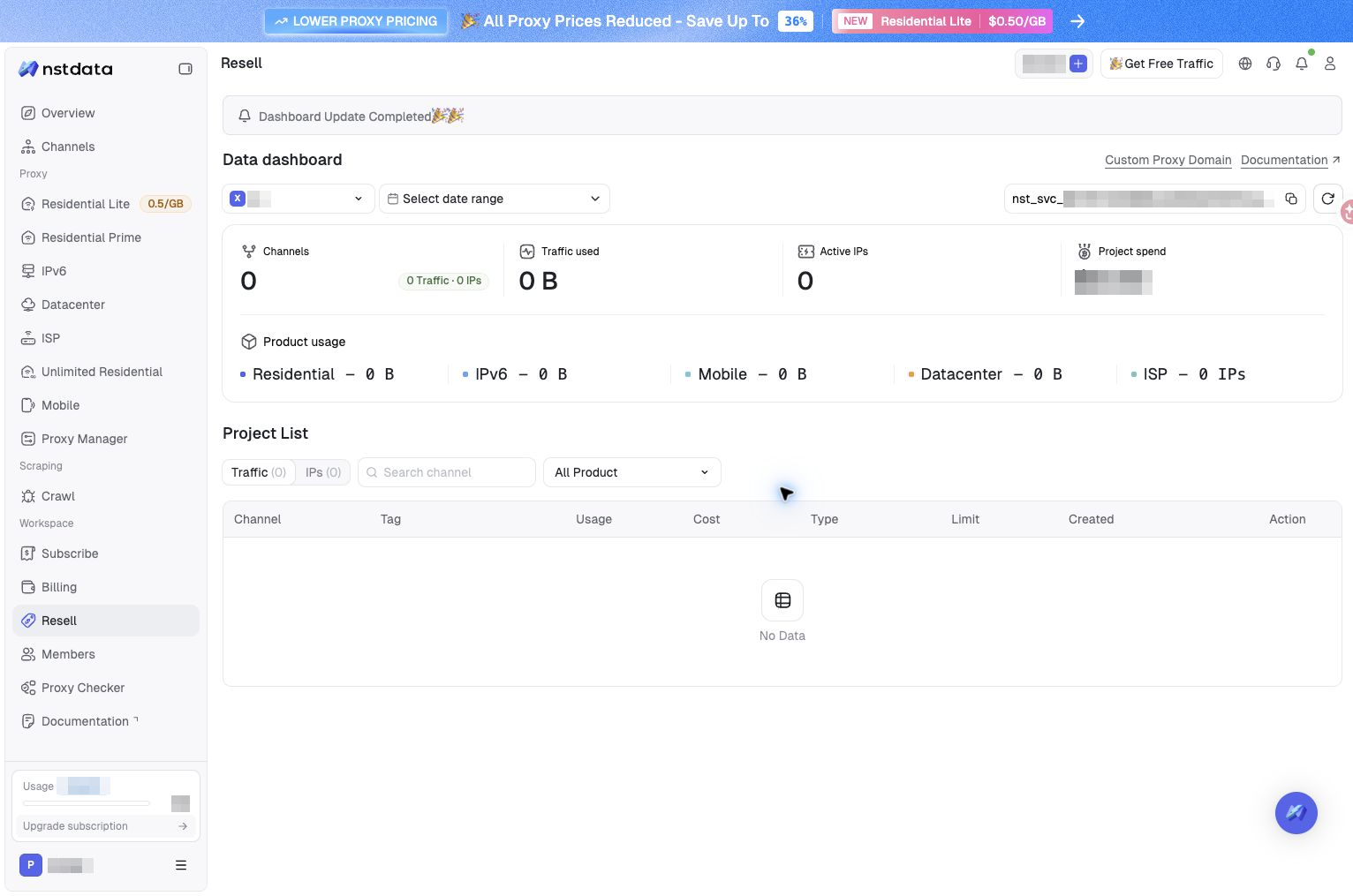
Only the token's format prefix is visible in this screenshot; the secret portion is redacted. Account and project names, balances, and other sensitive information are also redacted. For actual requests, copy the full token from your own project.
If no projects are available or the page displays No service token, contact Nstdata support to confirm that your Resell service is activated.
Step 2: Use the token in API requests
In the Authorization header of your server-side request, enter Bearer, followed by a space and your full Service Token:
Authorization: Bearer nst_svc_your_service_tokenFor example, the following request retrieves available residential proxy zones. Replace nst_svc_your_service_token with the full token you just copied, including the nst_svc_ prefix:
curl --request GET 'https://api.nstdata.io/api/v1/service/zones?type=residential' \
  --header 'Authorization: Bearer nst_svc_your_service_token'
In an API client such as Postman or Apifox, add an Authorization entry under Headers and set its value to Bearer YOUR_FULL_TOKEN. If you select the Bearer Token authentication method instead, enter only the full token in the Token field; do not add Bearer again.
Service Tokens are used for Resell endpoints under /api/v1/service/ and are bound to the corresponding project's team. Use the token for your intended project. Do not substitute Dashboard login credentials or a proxy connection password, and do not use x-team-id to switch teams.
Store and reset your token
- Store and use the token only in a secure server-side environment, preferably through server-side environment variables or a secrets manager. Do not expose it in browser scripts, client applications, public code repositories, or logs.
- Reset token, to the right of the token field, resets the token rather than copying it. The old token stops working immediately after a reset. Update every server-side integration that uses it.
- If a request fails authentication, check that you copied the full token, included a space after
Bearer, and are not using an old token from before a reset.
For complete authentication instructions, request parameters, response structures, and code examples, see the Resell API Documentation (opens in a new tab).